Identify your firmware
The next steps will depend of your current firmware version.
To identify your current firmware version, go to System Settings > System Version.
Identify if you are on Official or Custom Firmware:
Official Firmware
System version is only composed of numbers:
For exemple, 5.02 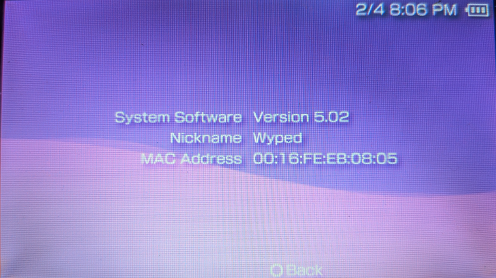
You are on an Official Firmware.
Custom Firmware
System version has letters following the version number:
For exemple, 4.01 M33-2 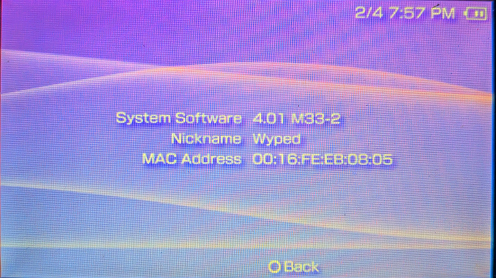
You are on Custom Firmware.
Use the table below to select the step you need to follow to update your version to the 6.61 Official Firmware.
↓ Next, choose the case that applies to you to continue. ↓
I'm on Official Firmware:
If you are on official firmware, you can proceed to the next page, Update to 6.61 Official Firmware.
I'm on Custom Firmware:
Custom Firmware version 3.XX or below
If you are running an older custom firmware of version 3.XX (M33, OE, SE,...) or below, you must follow the 3.XX (and below) Custom Firmware Update Guide.
Custom Firmware 4.XX / 5.XX M33
If you are running a 4.XX or 5.XX M33 custom firmware, proceed to the next page, Update to 6.61 Official Firmware.
Custom Firmware 5.XX GEN
If you are running a 5.XX GEN custom firmware, you must follow the 5.XX GEN Custom Firmware Update Guide.
Custom Firmware 6.20 (TN, ME, PRO)
If you are running a 6.20 custom firmware, proceed to the next page, Update to 6.61 Official Firmware.
Custom Firmware 6.3X, 6.6X (ME, PRO) with or without Infinity ∞
If you are running a 6.3X or 6.6X custom firmware with or without Infinity, you must follow the 6.3X / 6.6X Custom Firmware Update Guide.